Draw shapes and texts
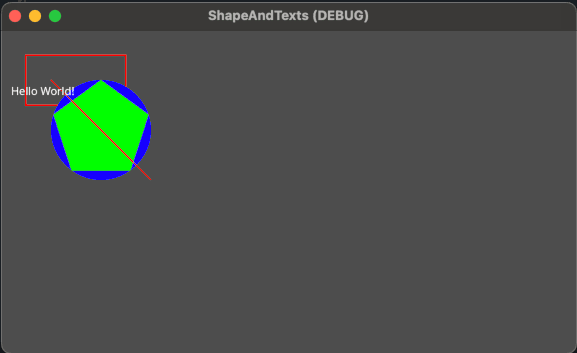
In this tutorial we will draw rectangle, circle, polygon and simple texts using the bases functions.
- Godot Engine

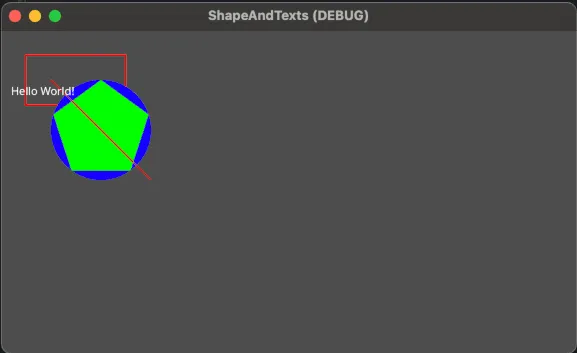
To draw the shapes we need to put everything inside a draw function.
Draw the outline of a rectangle
To draw the outline of a rectangle we use the same function as the rectangle filled, the parameter to indicated the outline is a boolean.
Here is the definition of the function:
void draw_rect(rect: Rect2,
               color: Color,
               filled: bool = true,
               width: float = -1.0,
               antialiased: bool = false)
You can put this code in a new script file ShapeExample.cs:
using Godot;
using System;

public partial class ShapesExample : Node2D
{
    public override void _Draw()
    {
        // Define the rectangle position and size
        Rect2 rect = new Rect2(50, 50, 200, 100);
        // Define the color of the outline
        Color outlineColor = Colors.Red;
        // Define the thickness of the outline
        float thickness = 3.0f;
        // Draw the outline of the rectangle
        DrawRect(rect, outlineColor, false, thickness); // false indicate the outline
    }
}
Draw a circle shapes
To Draw a circle you can do the same as the Rectangle.
Here is the definition of the function:
draw_circle(position: Vector2,
            radius: float,
            color: Color,
            filled: bool = true,
            width: float = -1.0,
            antialiased: bool = false)
You can put this example in the draw function:
// Define the center position of the circle
Vector2 center = new Vector2(200, 200);
// Define the radius of the circle
float radius = 100.0f;
// Define the color of the circle
Color color = Colors.Blue;
// Draw the circle
DrawCircle(center, radius, color);
Draw a Polygon shapes
To Draw a polygon you can use this example of a pentagon.
Here is the function we will use to display the polygon:
void draw_polygon(points: PackedVector2Array,
                  colors: PackedColorArray,
                  uvs: PackedVector2Array = PackedVector2Array(),
                  texture: Texture2D = null)
You can put this example in the draw function:
// Define the center of the pentagon
Vector2 center = new Vector2(200, 200);
// Define the radius of the pentagon (distance from the center to a vertex)
float radius = 100.0f;
// Define the color of the pentagon
Color color = Colors.Green;
// Calculate the vertices of the pentagon
Vector2[] points = new Vector2[5];
for (int i = 0; i < 5; i++)
{
    // Convert angle from degrees to radians manually
    float angle = (72 * i - 90) * Mathf.Pi / 180.0f;
    points[i] = center + new Vector2(Mathf.Cos(angle) * radius, Mathf.Sin(angle) * radius);
}
// Draw the pentagon
DrawPolygon(points, new Color[] { color });
Draw a line
To draw a line you simply need a starting and a end point with some thickness and color:
void draw_line(from: Vector2,
               to: Vector2,
               color: Color,
               width: float = -1.0,
               antialiased: bool = false)
You can put this example in the draw function:
// Define the start and end points of the line
Vector2 startPoint = new Vector2(100, 100);
Vector2 endPoint = new Vector2(300, 300);
// Define the color of the line
Color lineColor = Colors.Red;
// Define the thickness of the line
float thickness = 2.0f;
// Draw the line
DrawLine(startPoint, endPoint, lineColor, thickness);
Draw texts
To draw some texts using the low level function, you will need a font: NotoSans-Regular.ttf, then the font need to be loaded.
After that you can display some texts using the function:
void draw_string(font: Font,
                 pos: Vector2,
                 text: String,
                 alignment: HorizontalAlignment = 0,
                 width: float = -1,
                 font_size: int = 16,
                 modulate: Color = Color(1, 1, 1, 1),
                 justification_flags: BitField[JustificationFlag] = 3,
                 direction: Direction = 0,
                 orientation: Orientation = 0) const
You can put this example in the draw function:
private Font _defaultFont;

public override void _Ready()
{
    _defaultFont = GD.Load<FontFile>("res://NotoSans-Regular.ttf");
}

public override void _Draw()
{
    DrawString(_defaultFont, new Vector2(20f, 130f), "Hello World!", HorizontalAlignment.Center, -1, 22);
}
Download the full project
You can download the full project here: shapeandtexts.7z