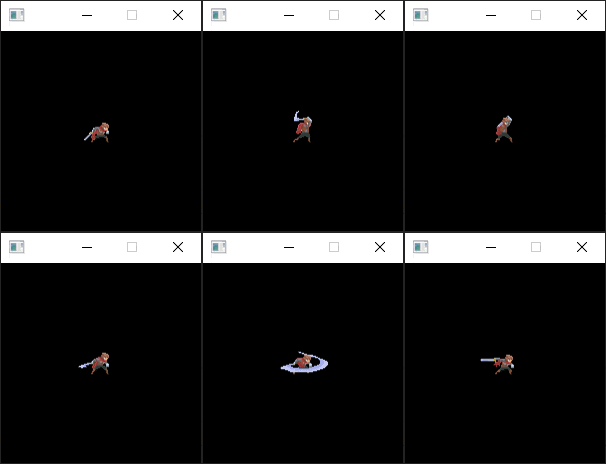

Sprite Animations with SDL2 and SDL_gpu
Making some simple sprite animations from a sprite sheet with SDL2 and SDL_gpu. SDL_gpu is not mandatory but it's a handy library for the rendering.
- SDL2, SDL2_gpu

This tutorial demonstrates how to implement sprite animations from a spritesheet using SDL2 and SDL_gpu in C++.
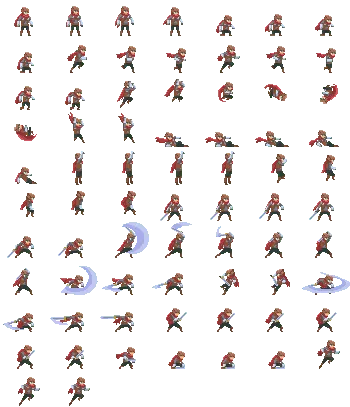
The tutorial uses the Animated pixel hero spritesheet:
1. Initialization and Asset Loading
First, initialize the SDL2 video subsystem, set up an OpenGL render target with SDL_gpu, and load the spritesheet image:
SDL_Init(SDL_INIT_VIDEO);
GPU_Target *window = GPU_InitRenderer(GPU_RENDERER_OPENGL_3, 200, 200, GPU_DEFAULT_INIT_FLAGS);
GPU_Image *hero = GPU_LoadImage("adventurer-sheet.png");
After that we can start loading the sequences for the animations.
Each sprite is an 50 x 37 images. We fill an array of region with each images and then create the sequence from that.
For this example, the sequences are stored the code to keep things simple, but normally you store them in a data file. Then the data are encoded as XML, JSON, LUA or even your own data format.
std::vector<GPU_Rect> rects;
size_t nbRow = 11;
size_t nbCol = 7;
size_t widthSpr = 50;
size_t heightSpr = 37;

for (size_t i = 0; i < nbRow; i++) {
	for (size_t j = 0; j < nbCol; j++) {
		rects.push_back(GPU_Rect{ (float) (j*widthSpr), (float) (i * heightSpr), (float) widthSpr, (float) heightSpr });
	}
}

std::vector<std::pair<size_t, size_t>> idle1  { {0, 0}, {0, 1}, {0, 2}, {0, 3} };
std::vector<std::pair<size_t, size_t>> crouch { {0, 4}, {0, 5}, {0, 6}, {1, 0} };
std::vector<std::pair<size_t, size_t>> run    { {1, 1}, {1, 2}, {1, 3}, {1, 4}, {1, 5}, {1, 6} };
std::vector<std::pair<size_t, size_t>> jump   { {2, 0}, {2, 1}, {2, 2}, {2, 3} };
std::vector<std::pair<size_t, size_t>> mid    { {2, 4}, {2, 5}, {2, 6}, {3, 0} };
std::vector<std::pair<size_t, size_t>> fall   { {3, 1}, {3, 2} };
std::vector<std::pair<size_t, size_t>> slide  { {3, 3}, {3, 4}, {3, 5}, {3, 6}, {4, 0} };
std::vector<std::pair<size_t, size_t>> grab   { {4, 1}, {4, 2}, {4, 3}, {4, 4}};
std::vector<std::pair<size_t, size_t>> climb  { {4, 5}, {4, 6}, {5, 0}, {5, 1}, {5, 2} };
std::vector<std::pair<size_t, size_t>> idle2  { {5, 3}, {5, 4}, {5, 5}, {5, 6} }; // another idle animations
std::vector<std::pair<size_t, size_t>> attack1{ {6, 0}, {6, 1}, {6, 2}, {6, 3}, {6, 4} }; // multiple attack animations
std::vector<std::pair<size_t, size_t>> attack2{ {6, 5}, {6, 6}, {7, 0}, {7, 1}, {7, 2}, {7, 3} };
std::vector<std::pair<size_t, size_t>> attack3{ {7, 4}, {7, 5}, {7, 6}, {8, 0}, {8, 1}, {8, 2} };
std::vector<std::pair<size_t, size_t>> hurt   { {8, 3}, {8, 4}, {8, 5} };
std::vector<std::pair<size_t, size_t>> die    { {8, 6}, {9, 0}, {9, 1}, {9, 2}, {9, 3}, {9, 4}, {9, 5} };
std::vector<std::pair<size_t, size_t>> jump2  { {9, 6}, {10, 0}, {10, 1} };

We need to keep track of time to know when to switch to the next image:

std::vector<std::pair<size_t, size_t>> current = idle1;
size_t index = 0;

double maxDuration = 150;
double timeBuffer = 0;
double timeElapsed = 0;
SDL_Event event;

bool done = 0;
Starting the main loop I will measure time at the beginning of the loop in nanoseconds.
The time elapsed will be useful to know when to switch to the next images and also limit the framerate to 30 fps.
The framerate need to be fixed to have a good animation, 30 fps is enough but you can use 60 fps if you want.
while (!done) {
	double elapsedNano = 0;
	auto t1 = Clock::now();
Clock is a typedef:
typedef std::chrono::high_resolution_clock Clock;The event loop is quite long because we need to switch easily between each sequence.
Each time a key is pressed a new animation sequence starts.
while (SDL_PollEvent(&event)) {
	if (event.type == SDL_QUIT)
		done = 1;
	else if (event.type == SDL_KEYDOWN) {
		if (event.key.keysym.sym == SDLK_ESCAPE)
			done = 1;

		if (event.key.keysym.scancode == SDL_SCANCODE_Q) {
			current = idle1;
		}
		else if (event.key.keysym.scancode == SDL_SCANCODE_W) {
			current = crouch;
		}
		else if (event.key.keysym.scancode == SDL_SCANCODE_E) {
			current = run;
		}
		else if (event.key.keysym.scancode == SDL_SCANCODE_R) {
			current = jump;
		}
		else if (event.key.keysym.scancode == SDL_SCANCODE_T) {
			current = mid;
		}
		else if (event.key.keysym.scancode == SDL_SCANCODE_Y) {
			current = fall;
		}
		else if (event.key.keysym.scancode == SDL_SCANCODE_U) {
			current = slide;
		}
		else if (event.key.keysym.scancode == SDL_SCANCODE_I) {
			current = grab;
		}
		else if (event.key.keysym.scancode == SDL_SCANCODE_O) {
			current = climb;
		}
		else if (event.key.keysym.scancode == SDL_SCANCODE_P) {
			current = idle2;
			}
		else if (event.key.keysym.scancode == SDL_SCANCODE_A) {
			current = attack1;
		}
		else if (event.key.keysym.scancode == SDL_SCANCODE_S) {
			current = attack2;
		}
		else if (event.key.keysym.scancode == SDL_SCANCODE_D) {
			current = attack3;
		}
		else if (event.key.keysym.scancode == SDL_SCANCODE_F) {
			current = hurt;
		}
		else if (event.key.keysym.scancode == SDL_SCANCODE_G) {
			current = die;
		}
		else if (event.key.keysym.scancode == SDL_SCANCODE_H) {
			current = jump;
		}
		index = 0;
	}
}
After the event loop we can start the rendering
GPU_Clear(window);
auto currentPair = current[index];
size_t position = currentPair.second + currentPair.first * nbCol;
GPU_BlitTransformX(hero, &rects[position], window, 75, 75, 0, 0, 0, 1, 1);
GPU_Flip(window);
After the rendering we need to update the time of the current animation and switch to the next image if the maximum time is passed.
timeBuffer = timeBuffer + timeElapsed;

// update the animation
if (timeBuffer > maxDuration) {
	timeBuffer = 0;
	index++;

	if (index >= current.size())
		index = 0;
}
We limit the framerate to 30 fps using SDL_Delay:
auto t2 = Clock::now();

elapsedNano = (double)(std::chrono::duration_cast<std::chrono::nanoseconds>(t2 - t1).count());

if (elapsedNano > 0) {
	double diff = ((1000000000.f / 30.f) - elapsedNano) / 1000000.f;

	if (diff > 0) {
		SDL_Delay((Uint32)diff);
	}
}

auto t3 = Clock::now();

timeElapsed = (double)(std::chrono::duration_cast<std::chrono::nanoseconds>(t3 - t1).count()) / 1000000.f;

Everything is done in the main loop, we can free the resources and quit.

GPU_FreeImage(hero);
GPU_FreeTarget(window);
GPU_Quit();
SDL_Quit();

return 0;
You can download the project: SpriteSheetAnimation.7z