How to animate Sprites with Sprite Sheets and Frame Timing in SDL3
Learn how to animate 2D characters and objects using sprite sheets and frame timing in SDL3. A complete step-by-step guide to smooth, frame-based animation in your SDL3 games.
- SDL3, SDL3_Image

Initialization
Create the window and the renderer
SDL_Init(SDL_INIT_VIDEO);
SDL_Window *window = SDL_CreateWindow("SDL3 Sprite Animation", 200, 200, SDL_WINDOW_OPENGL);
SDL_Renderer *renderer = SDL_CreateRenderer(window, NULL);
Load the sprite sheet
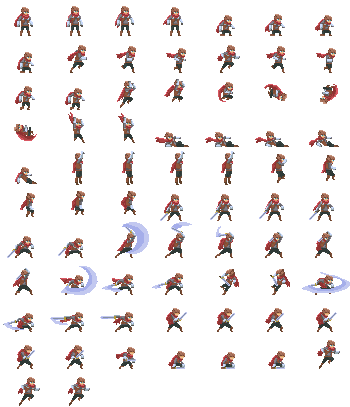
SDL_Surface *spriteSheetSurface = IMG_Load("adventurer-sheet.png");
if (!spriteSheetSurface) {
    std::cerr << "Failed to load sprite sheet: " << SDL_GetError() << std::endl;
    return 1;
}
Here the sprite spritesheet has transparency but if you use an old spritesheet where there is a key color you can define the key color like this:
SDL_SetSurfaceColorKey( spriteSheetSurface,
                        true,
                        SDL_MapRGB(SDL_GetPixelFormatDetails(spriteSheetSurface->format), NULL, 255, 0, 255) // Magenta
                        );
Create the texture
SDL_Texture *spriteSheet = SDL_CreateTextureFromSurface(renderer, spriteSheetSurface);
SDL_DestroySurface(spriteSheetSurface);
Split the spritesheet
Since the spritesheet is column and rows based, we can define the same area for each sprite:
size_t nbRow = 11;
size_t nbCol = 7;
size_t widthSpr = 50;
size_t heightSpr = 37;
std::vector<SDL_FRect> rects;
for (size_t i = 0; i < nbRow; i++) {
    for (size_t j = 0; j < nbCol; j++) {
        rects.push_back(SDL_FRect{ static_cast<float>(j * widthSpr),
                                   static_cast<float>(i * heightSpr),
                                   static_cast<float>(widthSpr),
                                   static_cast<float>(heightSpr) });
    }
}
We can then define the serie of image for each animations:
std::vector<std::pair<size_t, size_t>> idle1  { {0, 0}, {0, 1}, {0, 2}, {0, 3} };
std::vector<std::pair<size_t, size_t>> crouch { {0, 4}, {0, 5}, {0, 6}, {1, 0} };
std::vector<std::pair<size_t, size_t>> run    { {1, 1}, {1, 2}, {1, 3}, {1, 4}, {1, 5}, {1, 6} };
The frame timing
To record the time for each frame we use a buffer and a duration, the time elapsed is also stored:
double maxDuration = 150; // in ms for one frame of the aniamtion
double timeBuffer = 0; // in ms
double timeElapsed = 0; // in ms
The event loop
// before the event loop we use init a counter
double elapsedNano = 0; // time elasped in nano seconds
auto t1 = Clock::now();
while (SDL_PollEvent(&event)) {
    if (event.type == SDL_EVENT_QUIT) done = true;
    if (event.type == SDL_EVENT_KEY_DOWN) {
        SDL_Keycode code = event.key.key;
        if (code == SDLK_ESCAPE) done = true;
        else if (code == SDLK_Q) current = idle1;
        else if (code == SDLK_W) current = crouch;
        else if (code == SDLK_E) current = run;
        index = 0;
    }
}
The rendering
We can render the current animatioon selected, the mapping to transform the indexed i, j to the sprite sheet is given by:
auto currentPair = current[index];
size_t pos = currentPair.second + currentPair.first * nbCol;SDL_SetRenderDrawColor(renderer, 0, 0, 0, 255);
SDL_RenderClear(renderer);
auto currentPair = current[index];
size_t pos = currentPair.second + currentPair.first * nbCol;
SDL_FRect src = rects[pos];
SDL_FRect dst = {75, 75, static_cast<float>(widthSpr), static_cast<float>(heightSpr)};
SDL_RenderTexture(renderer, spriteSheet, &src, &dst);
SDL_RenderPresent(renderer);Update the animation
Then we need to update the animation base on the time elapsed and time buffer.
It’s pretty simple if the buffer is larger than the maxDuration we update the index of the animation.
timeBuffer += timeElapsed;
if (timeBuffer > maxDuration) {
    timeBuffer = 0;
    index = (index + 1) % current.size();
}
Limit the framerate
We need to limit the framerate for that we use the elapsed nano variable :
auto t2 = Clock::now();
elapsedNano = static_cast<double>(std::chrono::duration_cast<std::chrono::nanoseconds>(t2 - t1).count());
if (elapsedNano > 0) {
    double delayMs = ((1000000000.0 / 30.0) - elapsedNano) / 1000000.0;
    if (delayMs > 0) SDL_Delay(static_cast<Uint32>(delayMs));
}
And we also need too update the time of the animation:
auto t3 = Clock::now();
timeElapsed = static_cast<double>(std::chrono::duration_cast<std::chrono::nanoseconds>(t3 - t1).count()) / 1000000.0;
Full project : Animating Sprites with Sprite Sheets and Frame Timing in SDL3
You can download the full project:
- For macos: SDL3_SpriteSheetAnimation_mac.7z
- For windows: SDL3_SpriteSheetAnimation_win.7z
- For linux: SDL3_SpriteSheetAnimation_linux.7z