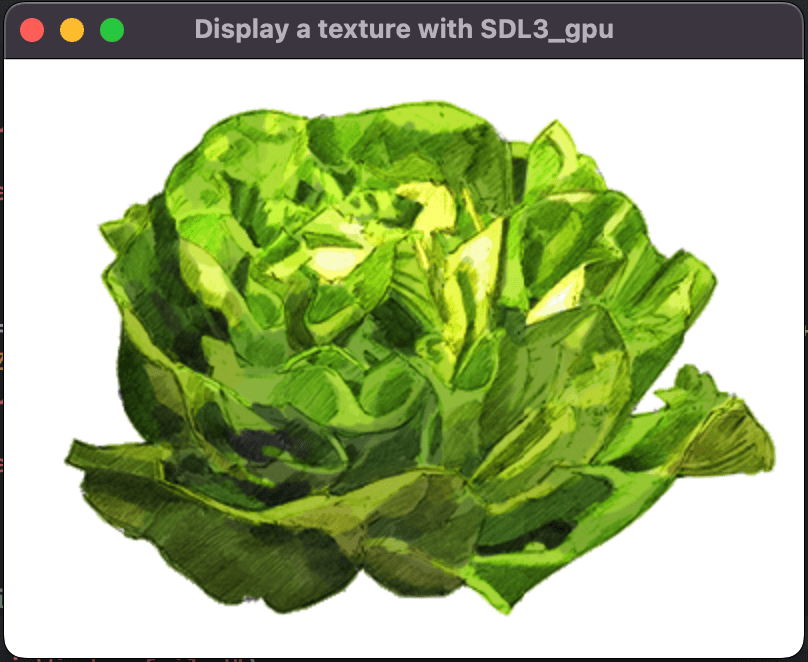
Display a texture with SDL3_gpu
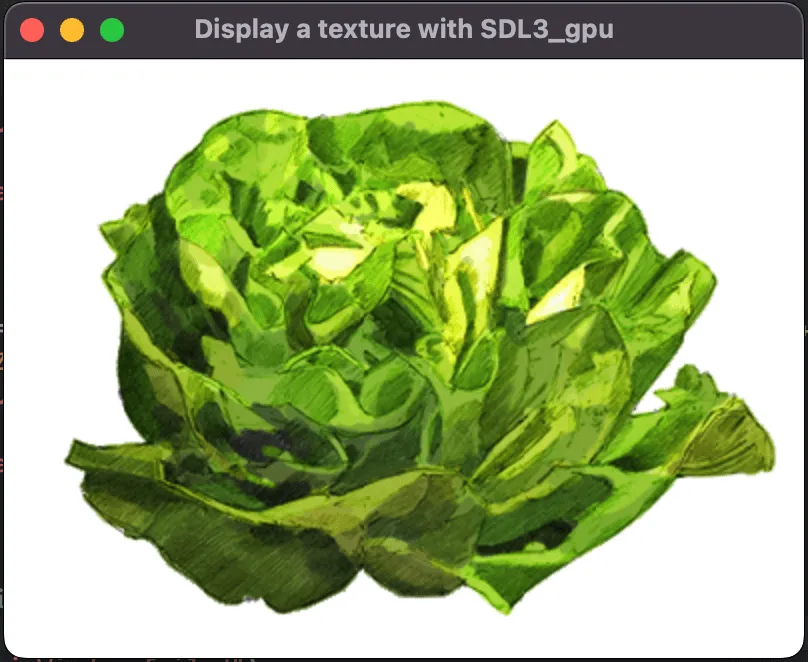
Display a texture with SDL3_gpu. This step-by-step tutorial covers context creation, loading of a texture and use it with a hlsl shaders, how to setup a sampler.
- SDL3

Create the device and the window
You already know how to create the window and the device. If not, refer to the previous tutorial: Getting started with SDL3_gpu.
SDL_Init(SDL_INIT_VIDEO);

SDL_GPUDevice* device = SDL_CreateGPUDevice(
    SDL_GPU_SHADERFORMAT_SPIRV | SDL_GPU_SHADERFORMAT_DXIL | SDL_GPU_SHADERFORMAT_MSL,
    false,
    NULL
);
if (device == NULL)
{
    SDL_Log("CreateDevice failed");
    return -1;
}

SDL_Window* window = SDL_CreateWindow("Display a triangle with SDL3_gpu", 800, 600, SDL_WINDOW_RESIZABLE);
if (window == NULL)
{
    SDL_Log("CreateWindow failed: %s", SDL_GetError());
    return -1;
}

if (!SDL_ClaimWindowForGPUDevice(device, window))
{
    SDL_Log("ClaimWindow failed");
    return -1;
}
Load the shaders
To display a texture we need a vertex shader and a fragment shader.
InitializeAssetLoader();

SDL_GPUShader* vertexShader = LoadShader(device, "TexturedQuad.vert", 0, 0, 0, 0);
if (vertexShader == NULL)
{
    SDL_Log("Failed to create vertex shader!");
    return -1;
}

SDL_GPUShader* fragmentShader = LoadShader(device, "TexturedQuad.frag", 1, 0, 0, 0);
if (fragmentShader == NULL)
{
    SDL_Log("Failed to create fragment shader!");
    return -1;
}
The vertex shader
The vertex shader is simple: it takes the position and the texture coordinates as input and passes them to the output for the fragment shader.
Download precompiled shaders: shaders.zip
struct Input
{
    float3 Position : TEXCOORD0;
    float2 TexCoord : TEXCOORD1;
};

struct Output
{
    float2 TexCoord : TEXCOORD0;
    float4 Position : SV_Position;
};

Output main(Input input)
{
    Output output;
    output.TexCoord = input.TexCoord;
    output.Position = float4(input.Position, 1.0f);
    return output;
}
The fragment shader
The fragment shader uses a Texture2D and a SamplerState to sample the texture at the given TexCoord.
Texture2D<float4> Texture : register(t0, space2);
SamplerState Sampler : register(s0, space2);

float4 main(float2 TexCoord : TEXCOORD0) : SV_Target0
{
    return Texture.Sample(Sampler, TexCoord);
}
Load the image
To load the image, we create a LoadImage function that uses the BMP format to avoid relying on SDL3_image.
SDL_Surface* LoadImage(const char* imageFilename, int desiredChannels)
{
    char fullPath[256];
    SDL_Surface *result;
    SDL_PixelFormat format;

    SDL_snprintf(fullPath, sizeof(fullPath), "%s%s", BasePath, imageFilename);
    result = SDL_LoadBMP(fullPath);
    if (result == NULL)
    {
        SDL_Log("Failed to load BMP: %s", SDL_GetError());
        return NULL;
    }

    if (desiredChannels == 4)
    {
        format = SDL_PIXELFORMAT_ABGR8888;
    }
    else
    {
        SDL_assert(!"Unexpected desiredChannels");
        SDL_DestroySurface(result);
        return NULL;
    }

    if (result->format != format)
    {
        SDL_Surface *next = SDL_ConvertSurface(result, format);
        SDL_DestroySurface(result);
        result = next;
    }

    return result;
}
Call the function to load the texture asset:
Download image asset: lettuce.bmp
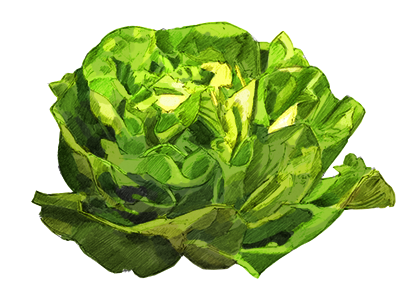
SDL_Surface *imageData = LoadImage("lettuce.bmp", 4);
if (imageData == NULL)
{
    SDL_Log("Could not load image data!");
    return -1;
}
The pipeline
Define a structure to represent the vertex layout:
typedef struct PositionTextureVertex
{
    float x, y, z;
    float u, v;
} PositionTextureVertex;
Configure the pipeline with vertex attributes matching this structure:
SDL_GPUGraphicsPipelineCreateInfo pipelineCreateInfo = {
    .target_info = {
        .num_color_targets = 1,
        .color_target_descriptions = (SDL_GPUColorTargetDescription[]){{
            .format = SDL_GetGPUSwapchainTextureFormat(device, window)
        }},
    },
    .vertex_input_state = (SDL_GPUVertexInputState){
        .num_vertex_buffers = 1,
        .vertex_buffer_descriptions = (SDL_GPUVertexBufferDescription[]){{
            .slot = 0,
            .input_rate = SDL_GPU_VERTEXINPUTRATE_VERTEX,
            .instance_step_rate = 0,
            .pitch = sizeof(PositionTextureVertex)
        }},
        .num_vertex_attributes = 2,
        .vertex_attributes = (SDL_GPUVertexAttribute[]){{
            .buffer_slot = 0,
            .format = SDL_GPU_VERTEXELEMENTFORMAT_FLOAT3,
            .location = 0,
            .offset = 0
        }, {
            .buffer_slot = 0,
            .format = SDL_GPU_VERTEXELEMENTFORMAT_FLOAT2,
            .location = 1,
            .offset = sizeof(float) * 3
        }}
    },
    .primitive_type = SDL_GPU_PRIMITIVETYPE_TRIANGLELIST,
    .vertex_shader = vertexShader,
    .fragment_shader = fragmentShader
};
Create the pipeline and release shader objects:
SDL_GPUGraphicsPipeline *Pipeline = NULL;
Pipeline = SDL_CreateGPUGraphicsPipeline(device, &pipelineCreateInfo);
if (Pipeline == NULL)
{
    SDL_Log("Failed to create pipeline!");
    return -1;
}

SDL_ReleaseGPUShader(device, vertexShader);
SDL_ReleaseGPUShader(device, fragmentShader);
The sampler
It’s time to create a simple sampler and use neighbor interpolation.
SDL_GPUSamplerCreateInfo sampler_info{
    .min_filter = SDL_GPU_FILTER_NEAREST,
    .mag_filter = SDL_GPU_FILTER_NEAREST,
    .mipmap_mode = SDL_GPU_SAMPLERMIPMAPMODE_NEAREST,
    .address_mode_u = SDL_GPU_SAMPLERADDRESSMODE_CLAMP_TO_EDGE,
    .address_mode_v = SDL_GPU_SAMPLERADDRESSMODE_CLAMP_TO_EDGE,
    .address_mode_w = SDL_GPU_SAMPLERADDRESSMODE_CLAMP_TO_EDGE,
};
SDL_GPUSampler *Samplers = SDL_CreateGPUSampler(device, &sampler_info);
The function for the creation of the sampler is simple enough, but maybe you will want more informations about SDL_GPUSamplerCreateInfo:
typedef struct SDL_GPUSamplerCreateInfo {
    SDL_GPUFilter min_filter;                  // The minification filter to apply to lookups.
    SDL_GPUFilter mag_filter;                  // The magnification filter to apply to lookups.
    SDL_GPUSamplerMipmapMode mipmap_mode;      // The mipmap filter to apply to lookups.
    SDL_GPUSamplerAddressMode address_mode_u;  // The addressing mode for U coordinates outside [0, 1).
    SDL_GPUSamplerAddressMode address_mode_v;  // The addressing mode for V coordinates outside [0, 1).
    SDL_GPUSamplerAddressMode address_mode_w;  // The addressing mode for W coordinates outside [0, 1).
    float mip_lod_bias;                        // The bias to be added to mipmap LOD calculation.
    float max_anisotropy;                      // The anisotropy value clamp used by the sampler.
                                               // If enable_anisotropy is false, this is ignored.
    SDL_GPUCompareOp compare_op;               // The comparison operator to apply to fetched data before filtering.
    float min_lod;                             // Clamps the minimum of the computed LOD value.
    float max_lod;                             // Clamps the maximum of the computed LOD value.
    bool enable_anisotropy;                    // true to enable anisotropic filtering.
    bool enable_compare;                       // true to enable comparison against a reference value during lookups.
    Uint8 padding1;
    Uint8 padding2;
    SDL_PropertiesID props;                    // A properties ID for extensions. Should be 0 if no extensions are needed.
} SDL_GPUSamplerCreateInfo;
More informations about SDL_GPUFilter:
typedef enum SDL_GPUFilter {
    SDL_GPU_FILTER_NEAREST,  // Point filtering.
    SDL_GPU_FILTER_LINEAR    // Linear filtering.
} SDL_GPUFilter;
More informations about SDL_GPUSamplerMipmapMode:
typedef enum SDL_GPUSamplerMipmapMode {
    SDL_GPU_SAMPLERMIPMAPMODE_NEAREST,  // Point filtering.
    SDL_GPU_SAMPLERMIPMAPMODE_LINEAR    // Linear filtering.
} SDL_GPUSamplerMipmapMode;
More informations about SDL_GPUSamplerAddressMode:
typedef enum SDL_GPUSamplerAddressMode {
    SDL_GPU_SAMPLERADDRESSMODE_REPEAT,           // Specifies that the coordinates will wrap around.
    SDL_GPU_SAMPLERADDRESSMODE_MIRRORED_REPEAT,  // Specifies that the coordinates will wrap around mirrored.
    SDL_GPU_SAMPLERADDRESSMODE_CLAMP_TO_EDGE     // Specifies that the coordinates will clamp to the 0-1 range.
} SDL_GPUSamplerAddressMode;
More informations about SDL_GPUCompareOp:
typedef enum SDL_GPUCompareOp {
    SDL_GPU_COMPAREOP_INVALID,
    SDL_GPU_COMPAREOP_NEVER,             // The comparison always evaluates false.
    SDL_GPU_COMPAREOP_LESS,              // The comparison evaluates reference < test.
    SDL_GPU_COMPAREOP_EQUAL,             // The comparison evaluates reference == test.
    SDL_GPU_COMPAREOP_LESS_OR_EQUAL,     // The comparison evaluates reference <= test.
    SDL_GPU_COMPAREOP_GREATER,           // The comparison evaluates reference > test.
    SDL_GPU_COMPAREOP_NOT_EQUAL,         // The comparison evaluates reference != test.
    SDL_GPU_COMPAREOP_GREATER_OR_EQUAL,  // The comparison evaluates reference >= test.
    SDL_GPU_COMPAREOP_ALWAYS             // The comparison always evaluates true.
} SDL_GPUCompareOp;
The vertex buffer
Next we create the vertex buffer:
SDL_GPUBufferCreateInfo buffer_info {
    .usage = SDL_GPU_BUFFERUSAGE_VERTEX,
    .size = sizeof(PositionTextureVertex) * 4
};
SDL_GPUBuffer* VertexBuffer = SDL_CreateGPUBuffer(
    device,
    &buffer_info
);
SDL_SetGPUBufferName(
    device,
    VertexBuffer,
    "Lettuce Vertex Buffer"
);
The index buffer
Then the index buffer:
SDL_GPUBufferCreateInfo buffer_info2 {
    .usage = SDL_GPU_BUFFERUSAGE_INDEX,
    .size = sizeof(Uint16) * 6
};
SDL_GPUBuffer* IndexBuffer = SDL_CreateGPUBuffer(
    device,
    &buffer_info2
);
The texture
We need to create the texture from the SDL_Surface:
SDL_GPUTextureCreateInfo texture_info{
    .type = SDL_GPU_TEXTURETYPE_2D,
    .format = SDL_GPU_TEXTUREFORMAT_R8G8B8A8_UNORM,
    .width = static_cast<Uint32>(imageData->w),
    .height = static_cast<Uint32>(imageData->h),
    .layer_count_or_depth = 1,
    .num_levels = 1,
    .usage = SDL_GPU_TEXTUREUSAGE_SAMPLER
};
SDL_GPUTexture* Texture = SDL_CreateGPUTexture(device, &texture_info);
SDL_SetGPUTextureName(
    device,
    Texture,
    "Lettuce Texture"
);
Here some more informations about SDL_GPUTextureCreateInfo:
typedef struct SDL_GPUTextureCreateInfo {
    SDL_GPUTextureType type;          // The base dimensionality of the texture.
    SDL_GPUTextureFormat format;      // The pixel format of the texture.
    SDL_GPUTextureUsageFlags usage;   // How the texture is intended to be used by the client.
    Uint32 width;                     // The width of the texture.
    Uint32 height;                    // The height of the texture.
    Uint32 layer_count_or_depth;      // The layer count or depth of the texture.
                                      // This value is treated as a layer count on 2D array textures,
                                      // and as a depth value on 3D textures.
    Uint32 num_levels;                // The number of mip levels in the texture.
    SDL_GPUSampleCount sample_count;  // The number of samples per texel.
                                      // Only applies if the texture is used as a render target.
    SDL_PropertiesID props;           // A properties ID for extensions.
                                      // Should be 0 if no extensions are needed.
} SDL_GPUTextureCreateInfo;
The transfer buffer
Creation of the buffer for the vertices
We create the transfer buffer with the right size.
SDL_GPUTransferBufferCreateInfo transfer_info {
    .usage = SDL_GPU_TRANSFERBUFFERUSAGE_UPLOAD,
    .size = (sizeof(PositionTextureVertex) * 4) + (sizeof(Uint16) * 6)
};
SDL_GPUTransferBuffer* bufferTransferBuffer = SDL_CreateGPUTransferBuffer(
    device,
    &transfer_info
);
Fill the buffer with vertex data
We can now set the vertex data and the index data in the buffer:
PositionTextureVertex* transferData = (PositionTextureVertex*)SDL_MapGPUTransferBuffer(
    device,
    bufferTransferBuffer,
    false
);

transferData[0] = (PositionTextureVertex) { -1,  1, 0, 0, 0 };
transferData[1] = (PositionTextureVertex) {  1,  1, 0, 1, 0 };
transferData[2] = (PositionTextureVertex) {  1, -1, 0, 1, 1 };
transferData[3] = (PositionTextureVertex) { -1, -1, 0, 0, 1 };

Uint16* indexData = (Uint16*)&transferData[4];
indexData[0] = 0;
indexData[1] = 1;
indexData[2] = 2;
indexData[3] = 0;
indexData[4] = 2;
indexData[5] = 3;

SDL_UnmapGPUTransferBuffer(device, bufferTransferBuffer);
The data is now ready to be uploaded to the GPU.
Creation of the buffer for the texture
We also need to upload the data for the texture, for that we create another transfer buffer:
SDL_GPUTransferBufferCreateInfo transfer_info2 {
    .usage = SDL_GPU_TRANSFERBUFFERUSAGE_UPLOAD,
    .size = static_cast<Uint32>(imageData->w * imageData->h * 4)
};
SDL_GPUTransferBuffer* textureTransferBuffer = SDL_CreateGPUTransferBuffer(
    device,
    &transfer_info2
);
Fill the buffer with the texture data
We need to copy the pixels of the texture inside the buffer:
Uint8* textureTransferPtr = (Uint8*)SDL_MapGPUTransferBuffer(
    device,
    textureTransferBuffer,
    false
);
SDL_memcpy(textureTransferPtr, imageData->pixels, imageData->w * imageData->h * 4);
SDL_UnmapGPUTransferBuffer(device, textureTransferBuffer);
Upload the buffers
The vertex buffer
We create a command buffer to upload the vertex buffer:
SDL_GPUCommandBuffer* uploadCmdBuf = SDL_AcquireGPUCommandBuffer(device);
SDL_GPUCopyPass* copyPass = SDL_BeginGPUCopyPass(uploadCmdBuf);
SDL_GPUTransferBufferLocation location {
.transfer_buffer = bufferTransferBuffer,
.offset = 0
};
SDL_GPUBufferRegion region {
.buffer = VertexBuffer,
.offset = 0,
.size = sizeof(PositionTextureVertex) * 4
};
SDL_UploadToGPUBuffer(
copyPass,
&location,
®ion,
false
);The index buffer
SDL_GPUTransferBufferLocation location2 {
.transfer_buffer = bufferTransferBuffer,
.offset = sizeof(PositionTextureVertex) * 4
};
SDL_GPUBufferRegion region2 {
.buffer = IndexBuffer,
.offset = 0,
.size = sizeof(Uint16) * 6
};
SDL_UploadToGPUBuffer(
copyPass,
&location2,
®ion2,
false
);The texture buffer
The last buffer to upload, the texture buffer:
SDL_GPUTextureTransferInfo transfer_info3 {
.transfer_buffer = textureTransferBuffer,
.offset = 0 /* Zeros out the rest */
};
SDL_GPUTextureRegion region3 {
.texture = Texture,
.w = static_cast<Uint32>(imageData->w),
.h = static_cast<Uint32>(imageData->h),
.d = 1
};
SDL_UploadToGPUTexture(
copyPass,
&transfer_info3,
®ion3,
false
);The cleanup
We can end the copy pass, destroy the surface and the transfer buffers:
SDL_EndGPUCopyPass(copyPass);
SDL_SubmitGPUCommandBuffer(uploadCmdBuf);
SDL_DestroySurface(imageData);
SDL_ReleaseGPUTransferBuffer(device, bufferTransferBuffer);
SDL_ReleaseGPUTransferBuffer(device, textureTransferBuffer);
The event loop
Again the event loop has only one event: SDL_EVENT_QUIT.
The rendering
The command buffer and swapchain texture
Same thing as before, we create a command buffer and acquire the swapchain texture:
SDL_GPUCommandBuffer* cmdbuf = SDL_AcquireGPUCommandBuffer(device);
if (cmdbuf == NULL) {
    SDL_Log("AcquireGPUCommandBuffer failed: %s", SDL_GetError());
    return -1;
}

SDL_GPUTexture* swapchainTexture;
if (!SDL_WaitAndAcquireGPUSwapchainTexture(cmdbuf, window, &swapchainTexture, NULL, NULL)) {
    SDL_Log("WaitAndAcquireGPUSwapchainTexture failed: %s", SDL_GetError());
    return -1;
}
The render pass
This time the render pass is interesting because we need to bind the pipeline, the vertex buffer, the index buffer, and the sampler.
The draw function is different: SDL_DrawGPUIndexedPrimitives because we have two triangles to render:
if (swapchainTexture != NULL) {
    SDL_GPUColorTargetInfo colorTargetInfo = { 0 };
    colorTargetInfo.texture = swapchainTexture;
    colorTargetInfo.clear_color = (SDL_FColor){ 0.0f, 0.0f, 0.0f, 1.0f };
    colorTargetInfo.load_op = SDL_GPU_LOADOP_CLEAR;
    colorTargetInfo.store_op = SDL_GPU_STOREOP_STORE;

    SDL_GPURenderPass* renderPass = SDL_BeginGPURenderPass(cmdbuf, &colorTargetInfo, 1, NULL);

    SDL_GPUBufferBinding binding1 { .buffer = VertexBuffer, .offset = 0 };
    SDL_GPUBufferBinding binding2 { .buffer = IndexBuffer, .offset = 0 };
    SDL_GPUTextureSamplerBinding texture_binding { .texture = Texture, .sampler = Samplers };

    SDL_BindGPUGraphicsPipeline(renderPass, Pipeline);
    SDL_BindGPUVertexBuffers(renderPass, 0, &binding1, 1);
    SDL_BindGPUIndexBuffer(renderPass, &binding2, SDL_GPU_INDEXELEMENTSIZE_16BIT);
    SDL_BindGPUFragmentSamplers(renderPass, 0, &texture_binding, 1);
    SDL_DrawGPUIndexedPrimitives(renderPass, 6, 1, 0, 0, 0);
    SDL_EndGPURenderPass(renderPass);
}
After that we can submit the command buffer:
SDL_SubmitGPUCommandBuffer(cmdbuf);Download the full project : Display a texture with SDL3_gpu
- For macos: SDL3_Texture_mac.7z
- For windows: SDL3_Texture_win.7z
- For linux: SDL3_Texture_linux.7z