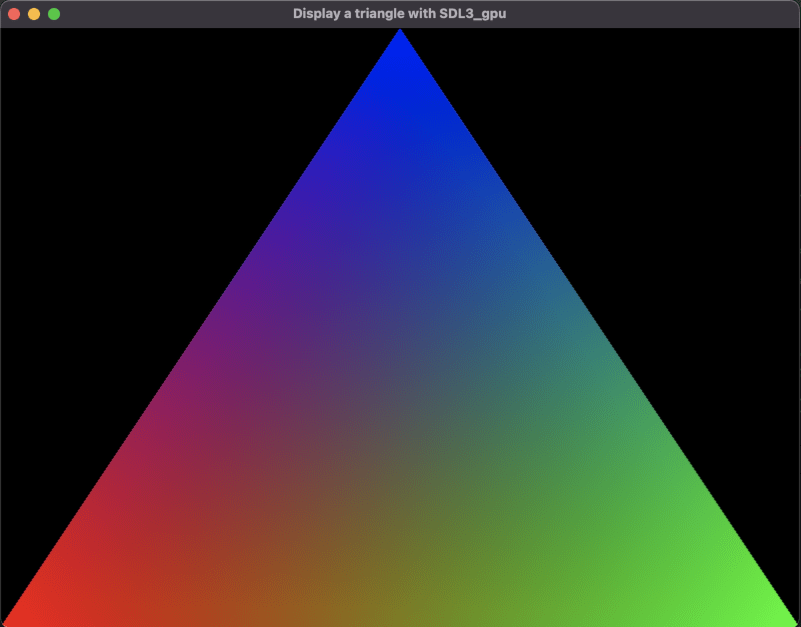
Display a triangle with SDL3_gpu
Display a triangle with SDL3_gpu. This step-by-step tutorial covers context creation, basic usage of loading and use a hlsl shaders, how to compile shaders with SDL_shadercross.
- SDL3

Create the device and the window
You already know how to create the window and the device, if not you can refer to the previous tutorial: Getting stated with SDL3_gpu
SDL_Init(SDL_INIT_VIDEO);
SDL_GPUDevice* device = SDL_CreateGPUDevice(
    SDL_GPU_SHADERFORMAT_SPIRV | SDL_GPU_SHADERFORMAT_DXIL | SDL_GPU_SHADERFORMAT_MSL,
    false,
    NULL
);
if (device == NULL)
{
    SDL_Log("CreateDevice failed");
    return -1;
}
SDL_Window* window = SDL_CreateWindow("Display a triangle with SDL3_gpu", 800, 600, SDL_WINDOW_RESIZABLE);
if (window == NULL)
{
    SDL_Log("CreateWindow failed: %s", SDL_GetError());
    return -1;
}
if (!SDL_ClaimWindowForGPUDevice(device, window))
{
    SDL_Log("ClaimWindow failed");
    return -1;
}
Load the shaders
This part is new, to display a triangle we need a shader
For that we want to be able to create a function that loads the shaders like this:
SDL_GPUShader* vertexShader = LoadShader(device, "RawTriangle.vert", 0, 0, 0, 0);
if (vertexShader == NULL)
{
    SDL_Log("Failed to create vertex shader!");
    return -1;
}
SDL_GPUShader* fragmentShader = LoadShader(device, "SolidColor.frag", 0, 0, 0, 0);
if (fragmentShader == NULL)
{
    SDL_Log("Failed to create fragment shader!");
    return -1;
}
The shader creation is pretty self explanatory:
We detect the stage based on the name, then we get the format of the shader and from the path we get the file of the shader, then we load the file.
Before creating the shader we fill the shader infos from the parameters.
SDL_GPUShader* LoadShader(
    SDL_GPUDevice* device,
    const char* shaderFilename,
    Uint32 samplerCount,
    Uint32 uniformBufferCount,
    Uint32 storageBufferCount,
    Uint32 storageTextureCount)
{
    SDL_GPUShaderStage stage;
    if (SDL_strstr(shaderFilename, ".vert"))
    {
        stage = SDL_GPU_SHADERSTAGE_VERTEX;
    }
    else if (SDL_strstr(shaderFilename, ".frag"))
    {
        stage = SDL_GPU_SHADERSTAGE_FRAGMENT;
    }
    else
    {
        SDL_Log("Invalid shader stage!");
        return NULL;
    }
    char fullPath[256];
    SDL_GPUShaderFormat backendFormats = SDL_GetGPUShaderFormats(device);
    SDL_GPUShaderFormat format = SDL_GPU_SHADERFORMAT_INVALID;
    const char *entrypoint;
    if (backendFormats & SDL_GPU_SHADERFORMAT_SPIRV) {
        SDL_snprintf(fullPath, sizeof(fullPath), "%s%s.spv", BasePath, shaderFilename);
        format = SDL_GPU_SHADERFORMAT_SPIRV;
        entrypoint = "main";
    } else if (backendFormats & SDL_GPU_SHADERFORMAT_MSL) {
        SDL_snprintf(fullPath, sizeof(fullPath), "%s%s.msl", BasePath, shaderFilename);
        format = SDL_GPU_SHADERFORMAT_MSL;
        entrypoint = "main0";
    } else if (backendFormats & SDL_GPU_SHADERFORMAT_DXIL) {
        SDL_snprintf(fullPath, sizeof(fullPath), "%s%s.dxil", BasePath, shaderFilename);
        format = SDL_GPU_SHADERFORMAT_DXIL;
        entrypoint = "main";
    } else {
        SDL_Log("%s", "Unrecognized backend shader format!");
        return NULL;
    }
    size_t codeSize;
    void* code = SDL_LoadFile(fullPath, &codeSize);
    if (code == NULL)
    {
        SDL_Log("Failed to load shader from disk! %s", fullPath);
        return NULL;
    }
    SDL_GPUShaderCreateInfo shaderInfo = {
        .code = (const Uint8 *)code,
        .code_size = codeSize,
        .entrypoint = entrypoint,
        .format = format,
        .stage = stage,
        .num_samplers = samplerCount,
        .num_uniform_buffers = uniformBufferCount,
        .num_storage_buffers = storageBufferCount,
        .num_storage_textures = storageTextureCount
    };
    SDL_GPUShader* shader = SDL_CreateGPUShader(device, &shaderInfo);
    if (shader == NULL)
    {
        SDL_Log("Failed to create shader!");
        SDL_free(code);
        return NULL;
    }
    SDL_free(code);
    return shader;
}
The first thing to note is that BasePath does not exist so we need to create it:
static const char* BasePath = NULL;
void InitializeAssetLoader()
{
    BasePath = SDL_GetBasePath();
}
The second thing is that we need to have 3 files for each shader for the different formats: SPIRV, DXIL, MSL.
For that we need to compile the shaders by hand or by using a tool.
Can you explain the code of the shaders?
The vertex shader
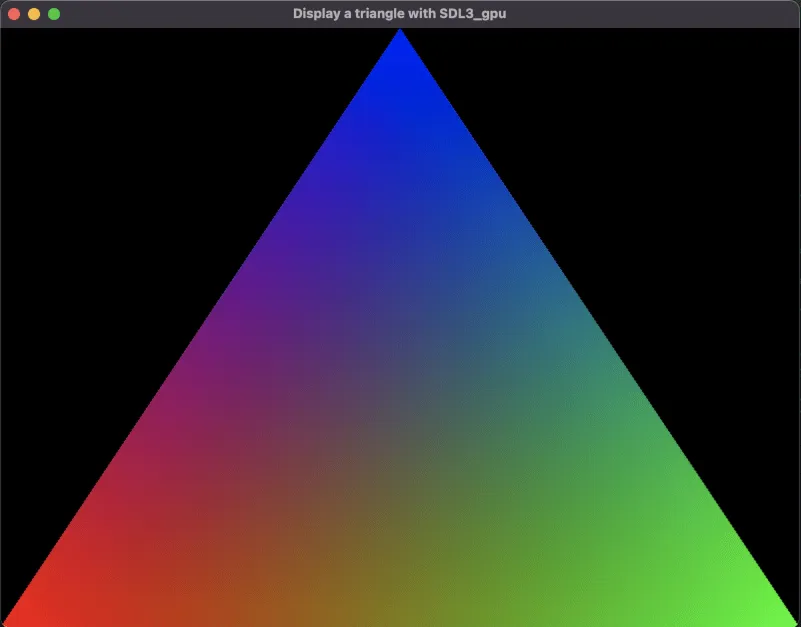
For the vertex shader we have basically everything about the triangle, we define the vertices:
(-1, -1)(1, -1)(0, 1)And the colors red, green and blue with maximal opacity.
struct Input{
    uint VertexIndex : SV_VertexID;
};
struct Output{
    float4 Color : TEXCOORD0;
    float4 Position : SV_Position;
};
Output main(Input input)
{
    Output output;
    float2 pos;
    if (input.VertexIndex == 0)
    {
        pos = (-1.0f).xx;
        output.Color = float4(1.0f, 0.0f, 0.0f, 1.0f);
    }
    else
    {
        if (input.VertexIndex == 1)
        {
            pos = float2(1.0f, -1.0f);
            output.Color = float4(0.0f, 1.0f, 0.0f, 1.0f);
        }
        else
        {
            if (input.VertexIndex == 2)
            {
                pos = float2(0.0f, 1.0f);
                output.Color = float4(0.0f, 0.0f, 1.0f, 1.0f);
            }
        }
    }
    output.Position = float4(pos, 0.0f, 1.0f);
    return output;
}
Why float4 and not float3 for the output position?
A typical 3D position is float3(x, y, z)
But for rendering, especially for transformations like projection (perspective), we need a float4(x, y, z, w)
This extra w component allows:
- Perspective division (x/w, y/w, z/w)
- Representation of points at infinity (used for directions like normals or rays)
The fragment shader
Since everything is defined in the vertex shader the fragment shader does nothing:
float4 main(float4 Color : TEXCOORD0) : SV_Target0
{
    return Color;
}
Compile the shaders with SDL_shadercross
A tool already exist fo that: SDL_shadercross you can download it and build it with cmake like you did for SDL3.
To compile the shader you need to execute shadercross like that:
./shadercross SolidColor.frag.hlsl -o SolidColor.frag.msl
./shadercross SolidColor.frag.hlsl -o SolidColor.frag.dxil
./shadercross SolidColor.frag.hlsl -o SolidColor.frag.spv
You need to do the same for the vertex shader.
You can download the shader from the SDL3_gpu example collection
This tutorial is also based of one of the examples but I tried to explain an simplyfy the code.
If you don’t want to explore the repo I can give you the shaders already compiled and archived: shaders.zip
Create the pipeline
Here is the pipeline creation where we specify the vertex and fragment shader, the fill mode and the primitive type.
SDL_GPUGraphicsPipelineCreateInfo pipelineCreateInfo = {
    .target_info = {
        .num_color_targets = 1,
        .color_target_descriptions = (SDL_GPUColorTargetDescription[]){{
            .format = SDL_GetGPUSwapchainTextureFormat(device, window)
        }},
    },
    .rasterizer_state.fill_mode = SDL_GPU_FILLMODE_FILL,
    .primitive_type = SDL_GPU_PRIMITIVETYPE_TRIANGLELIST,
    .vertex_shader = vertexShader,
    .fragment_shader = fragmentShader,
};

SDL_GPUGraphicsPipeline *pipeline = NULL;
pipeline = SDL_CreateGPUGraphicsPipeline(device, &pipelineCreateInfo);
if (pipeline == NULL)
{
    SDL_Log("Failed to create fill pipeline!");
    return -1;
}
We can then cleanup the shader ressouces:
SDL_ReleaseGPUShader(device, vertexShader);
SDL_ReleaseGPUShader(device, fragmentShader);
The event loop
We only have one type of event SDL_EVENT_QUIT to close the window since this is not the subject of the tutorial.
The rendering
For the rendering we will use a command buffer like before.
It does not need to be freed and can only be used on the thread is has been created.
The command buffer
To create the command buffer it is pretty simple: SDL_AcquireGPUCommandBuffer(device)
SDL_GPUCommandBuffer* cmdbuf = SDL_AcquireGPUCommandBuffer(device);
if (cmdbuf == NULL)
{
    SDL_Log("AcquireGPUCommandBuffer failed: %s", SDL_GetError());
    return -1;
}
The swapchain texture
SDL_GPUTexture* swapchainTexture;
if (!SDL_WaitAndAcquireGPUSwapchainTexture(cmdbuf, window, &swapchainTexture, NULL, NULL)) {
    SDL_Log("WaitAndAcquireGPUSwapchainTexture failed: %s", SDL_GetError());
    return -1;
}
The render pass
This time thee is more thing to the render pass. We must bind the pipeline wih SDL_BindGPUGraphicsPipeline before making draw calls.
We can then render the triangle with: SDL_DrawGPUPrimitives:
void SDL_DrawGPUPrimitives(
    SDL_GPURenderPass *render_pass, // the render pass
    Uint32 num_vertices,            // the number of vertices
    Uint32 num_instances,           // the number of instances
    Uint32 first_vertex,            // the first vertex
    Uint32 first_instance           // the first instance
);
It’s pretty easy now, one draw call to render the triangle
if (swapchainTexture != NULL)
{
    SDL_GPUColorTargetInfo colorTargetInfo = { 0 };
    colorTargetInfo.texture = swapchainTexture;
    colorTargetInfo.clear_color = (SDL_FColor){ 0.0f, 0.0f, 0.0f, 1.0f };
    colorTargetInfo.load_op = SDL_GPU_LOADOP_CLEAR;
    colorTargetInfo.store_op = SDL_GPU_STOREOP_STORE;

    SDL_GPURenderPass* renderPass = SDL_BeginGPURenderPass(cmdbuf, &colorTargetInfo, 1, NULL);
    SDL_BindGPUGraphicsPipeline(renderPass, pipeline);
    SDL_DrawGPUPrimitives(renderPass, 3, 1, 0, 0);

    SDL_EndGPURenderPass(renderPass);
}
Don’t forget to send the command buffer.
SDL_SubmitGPUCommandBuffer(cmdbuf);The cleanup
And outside the loop we can free the pipeline, the device and the window.
SDL_ReleaseGPUGraphicsPipeline(device, pipeline);
SDL_DestroyGPUDevice(device);
SDL_DestroyWindow(window);
Download the full project : Display a triangle with SDL3_gpu
- For macos: SDL3_Triangle_mac.7z
- For windows: SDL3_Triangle_win.7z
- For linux: SDL3_Triangle_linux.7z