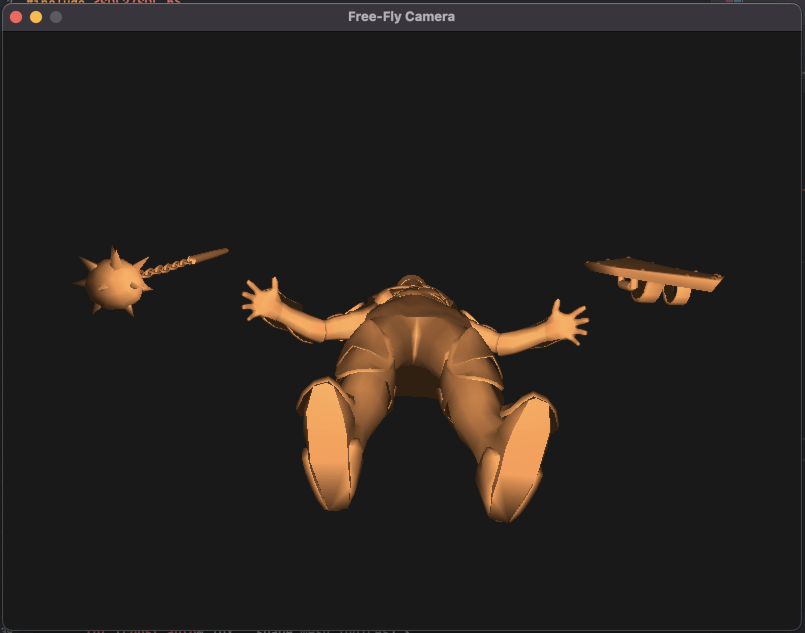
Loading OBJ Files with SDL3 and TinyOBJLoader: Complete Guide
Learn how to efficiently load and render OBJ 3D models in SDL3 using the TinyOBJLoader library. This step-by-step guide covers parsing, loading, and displaying OBJ files in your SDL3 projects.
- SDL3

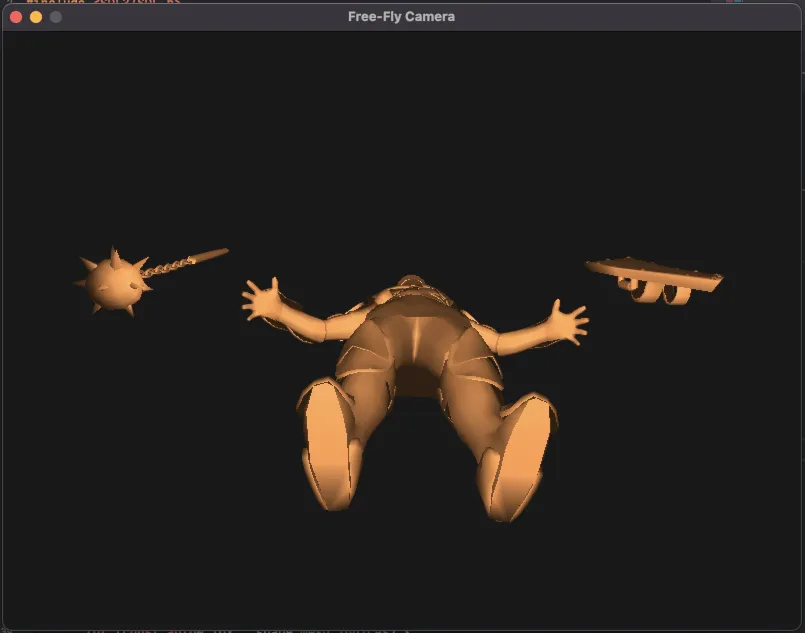
Initializations
SDL3 and OpenGL context
SDL_Init(SDL_INIT_VIDEO);
SDL_GL_SetAttribute(SDL_GL_DEPTH_SIZE, 24);

SDL_Window* window = SDL_CreateWindow("Free-Fly Camera", 800, 600, SDL_WINDOW_OPENGL);
SDL_GLContext glContext = SDL_GL_CreateContext(window);
SDL_GetWindowRelativeMouseMode(window); // Lock/hide mouse
OpenGL Setup
glEnable(GL_DEPTH_TEST);
glEnable(GL_LIGHTING);
glEnable(GL_LIGHT0);
glEnable(GL_COLOR_MATERIAL);
glColorMaterial(GL_FRONT_AND_BACK, GL_AMBIENT_AND_DIFFUSE);
glShadeModel(GL_SMOOTH);
The Light
GLfloat lightPos[] = { 2.0f, 4.0f, 2.0f, 1.0f };
glLightfv(GL_LIGHT0, GL_POSITION, lightPos);
The object
Here we set the object colors and load the object:
glClearColor(0.1f, 0.1f, 0.1f, 1.0f);
glColor3f(1.0f, 0.6f, 0.3f);  // Object color

if (!loadOBJ("base.obj")) {
    std::cerr << "Failed to load base.obj\n";
    return 1;
}
You can download the obj file here : base.obj
To load the obj file we need to download the library tinyobjloader, it’s an header file library to use it you simply need to define TINYOBJLOADER_IMPLEMENTATION before including it.
then to load the Obj we need a function using this library:
bool loadOBJ(const char* path) {
    tinyobj::attrib_t attrib;
    std::vector<tinyobj::shape_t> shapes;
    std::vector<tinyobj::material_t> materials;
    std::string warn, err;

    bool ret = tinyobj::LoadObj(&attrib, &shapes, &materials, &warn, &err, path);

    if (!warn.empty()) std::cout << "WARN: " << warn << std::endl;
    if (!err.empty()) std::cerr << "ERR: " << err << std::endl;

    if (!ret) return false;

    for (const auto& shape : shapes) {
        for (const auto& idx : shape.mesh.indices) {
            Vertex v{};
            v.x = attrib.vertices[3 * idx.vertex_index + 0];
            v.y = attrib.vertices[3 * idx.vertex_index + 1];
            v.z = attrib.vertices[3 * idx.vertex_index + 2];

            if (!attrib.normals.empty() && idx.normal_index >= 0) {
                v.nx = attrib.normals[3 * idx.normal_index + 0];
                v.ny = attrib.normals[3 * idx.normal_index + 1];
                v.nz = attrib.normals[3 * idx.normal_index + 2];
            }

            model.push_back(v);
        }
    }
    return true;
}
We define the model and the vertex struct like this:
struct Vertex {
    float x, y, z; // point
    float nx, ny, nz; // normal
};

std::vector<Vertex> model;
The camera
The nice things to see the object is to have a camera that can move around, for that we init some variables.
float camX = 0.0f, camY = 0.0f, camZ = 5.0f;  // Start outside
float yaw = 0.0f, pitch = 0.0f;
float moveSpeed = 0.1f;
float sensitivity = 0.2f;
The main loop
Here are all the code inside the main loop.
The event loop
For the event loop we use the motion of the mouse to orient the camera.
while (SDL_PollEvent(&e)) {
    if (e.type == SDL_EVENT_QUIT) running = false;
    if (e.type == SDL_EVENT_MOUSE_MOTION) {
        yaw   += e.motion.xrel * sensitivity;
        pitch += e.motion.yrel * sensitivity;

        if (pitch > 89.0f) pitch = 89.0f;
        if (pitch < -89.0f) pitch = -89.0f;
    }
}
Camera movement
The yaw and the pitch are set by the mouse, we now can compute the camera movement and adjust it based on the inputs.
float yawRad = yaw * 3.14159f / 180.0f;
float pitchRad = pitch * 3.14159f / 180.0f;

float forwardX = cosf(pitchRad) * sinf(yawRad);
float forwardY = sinf(pitchRad);
float forwardZ = -cosf(pitchRad) * cosf(yawRad);

float rightX = cosf(yawRad);
float rightZ = sinf(yawRad);

const bool* keys = SDL_GetKeyboardState(nullptr);

if (keys[SDL_SCANCODE_W]) {
    camX += forwardX * moveSpeed;
    camY += forwardY * moveSpeed;
    camZ += forwardZ * moveSpeed;
}
if (keys[SDL_SCANCODE_S]) {
    camX -= forwardX * moveSpeed;
    camY -= forwardY * moveSpeed;
    camZ -= forwardZ * moveSpeed;
}
if (keys[SDL_SCANCODE_A]) {
    camX -= rightX * moveSpeed;
    camZ += rightZ * moveSpeed;
}
if (keys[SDL_SCANCODE_D]) {
    camX += rightX * moveSpeed;
    camZ -= rightZ * moveSpeed;
}
The rendering
Clear the screen
glViewport(0, 0, 800, 600);
glClear(GL_COLOR_BUFFER_BIT | GL_DEPTH_BUFFER_BIT);
The camera projection
glMatrixMode(GL_PROJECTION);
glLoadIdentity();
perspective(60.0f, 800.0f / 600.0f, 0.1f, 1000.0f);
The perspective function is an implementation of gluPerspective:
void perspective(float fovY, float aspect, float zNear, float zFar) {
    float f = 1.0f / tanf(fovY * 0.5f * 3.14159f / 180.0f);
    float m[16] = {
        f / aspect, 0, 0, 0,
        0, f, 0, 0,
        0, 0, (zFar + zNear) / (zNear - zFar), -1,
        0, 0, (2 * zFar * zNear) / (zNear - zFar), 0
    };
    glLoadMatrixf(m);
}
Render the world and the model
glMatrixMode(GL_MODELVIEW);
glLoadIdentity();
glRotatef(-pitch, 1, 0, 0);
glRotatef(-yaw, 0, 1, 0);
glTranslatef(-camX, -camY, -camZ); // move world opposite to camera

drawModel();
The draw model function is simple:
void drawModel() {
    glBegin(GL_TRIANGLES);
    for (const auto& v : model) {
        glNormal3f(v.nx, v.ny, v.nz);
        glVertex3f(v.x, v.y, v.z);
    }
    glEnd();
}
Download the full project : Loading OBJ Files with SDL3 and TinyOBJLoader
- For macOS:
SDL3_3DLoader_mac.7z - For Windows:
SDL3_3DLoader_win.7z - For Linux:
SDL3_3DLoader_linux.7z