Expert
Display a 3D Cube with OpenGL and SDL3
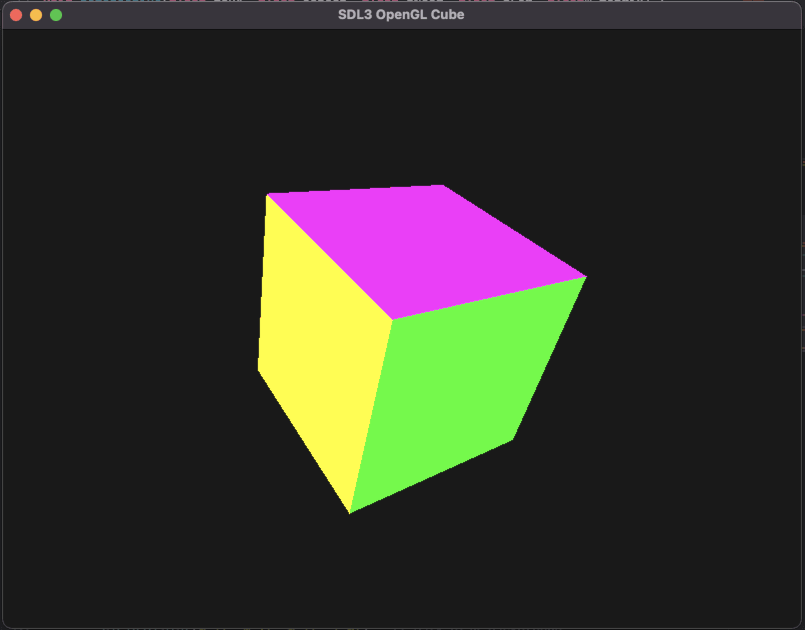
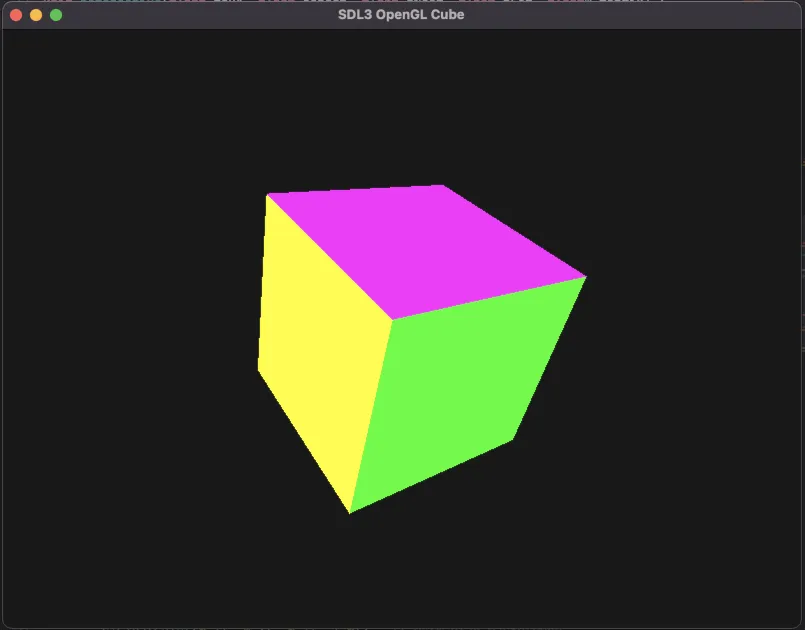
Learn how to render a 3D cube using modern OpenGL and SDL3. This step-by-step tutorial covers window creation, OpenGL context setup, cube rendering, and basic camera movement.
Prerequisites / Tools :
- SDL3

Initialization of the OpenGL context
Here we create the opengl context, the window and the renderer.
SDL_Init(SDL_INIT_VIDEO);

SDL_Window* window = SDL_CreateWindow(
    "SDL3 OpenGL Cube",
    800, 600,
    SDL_WINDOW_OPENGL | SDL_WINDOW_RESIZABLE
);

if (!window) {
    std::cerr << "CreateWindow Error: " << SDL_GetError() << "\n";
    SDL_Quit();
    return 1;
}

SDL_GLContext glContext = SDL_GL_CreateContext(window);
if (!glContext) {
    std::cerr << "GL Context Error: " << SDL_GetError() << "\n";
    SDL_DestroyWindow(window);
    SDL_Quit();
    return 1;
}

glEnable(GL_DEPTH_TEST);
The main loop
Here is all the code inside the main loop.
The event loop
The event loop is pretty simple only the quit event:
while (SDL_PollEvent(&e)) {
    if (e.type == SDL_EVENT_QUIT) running = false;
}
The rendering
Clear the screen
glViewport(0, 0, 800, 600);
glClearColor(0.1f, 0.1f, 0.1f, 1.0f);  // Dark gray background
glClear(GL_COLOR_BUFFER_BIT | GL_DEPTH_BUFFER_BIT);
The camera
glMatrixMode(GL_PROJECTION);
glLoadIdentity();
float proj[16];
perspective(60.0f, 800.0f / 600.0f, 1.0f, 100.0f, proj);
glLoadMatrixf(proj);
The perspective function is a reimplementation of the gluPerspective function:
void perspective(float fovY, float aspect, float zNear, float zFar, float* matrix) {
    float f = 1.0f / tanf(fovY * 0.5f * (3.14159265358979323846f / 180.0f));
    matrix[0]  = f / aspect;
    matrix[1]  = 0;
    matrix[2]  = 0;
    matrix[3]  = 0;
    matrix[4]  = 0;
    matrix[5]  = f;
    matrix[6]  = 0;
    matrix[7]  = 0;
    matrix[8]  = 0;
    matrix[9]  = 0;
    matrix[10] = (zFar + zNear) / (zNear - zFar);
    matrix[11] = -1;
    matrix[12] = 0;
    matrix[13] = 0;
    matrix[14] = (2 * zFar * zNear) / (zNear - zFar);
    matrix[15] = 0;
}
The 3D Cube
glMatrixMode(GL_MODELVIEW);
glLoadIdentity();
glTranslatef(0.0f, 0.0f, -5.0f);
glRotatef(angle, 1.0f, 1.0f, 0.0f);
drawCube();
The drawCube function build the cube using openGL:
void drawCube() {
    glBegin(GL_QUADS);

    // Front
    glColor3f(1, 0, 0);
    glVertex3f(-1, -1,  1);
    glVertex3f( 1, -1,  1);
    glVertex3f( 1,  1,  1);
    glVertex3f(-1,  1,  1);

    // Back
    glColor3f(0, 1, 0);
    glVertex3f(-1, -1, -1);
    glVertex3f(-1,  1, -1);
    glVertex3f( 1,  1, -1);
    glVertex3f( 1, -1, -1);

    // Top
    glColor3f(0, 0, 1);
    glVertex3f(-1, 1, -1);
    glVertex3f(-1, 1,  1);
    glVertex3f( 1, 1,  1);
    glVertex3f( 1, 1, -1);

    // Bottom
    glColor3f(1, 1, 0);
    glVertex3f(-1, -1, -1);
    glVertex3f( 1, -1, -1);
    glVertex3f( 1, -1,  1);
    glVertex3f(-1, -1,  1);

    // Right
    glColor3f(1, 0, 1);
    glVertex3f(1, -1, -1);
    glVertex3f(1,  1, -1);
    glVertex3f(1,  1,  1);
    glVertex3f(1, -1,  1);

    // Left
    glColor3f(0, 1, 1);
    glVertex3f(-1, -1, -1);
    glVertex3f(-1, -1,  1);
    glVertex3f(-1,  1,  1);
    glVertex3f(-1,  1, -1);

    glEnd();
}
Update the angle and the screen
angle += 0.5f;
SDL_GL_SwapWindow(window);
Download the full project : Display a 3D Cube with OpenGL and SDL3
- For macos: SDL3_3DCube_mac.7z
- For windows: SDL3_3DCube_win.7z
- For linux: SDL3_3DCube_linux.7z